ProSurf - Kiosk Browser1.8.1 - App Store

Please wait ... The app listing is being verified for availability.
You'll be able to see results in few seconds.


Publisher Description

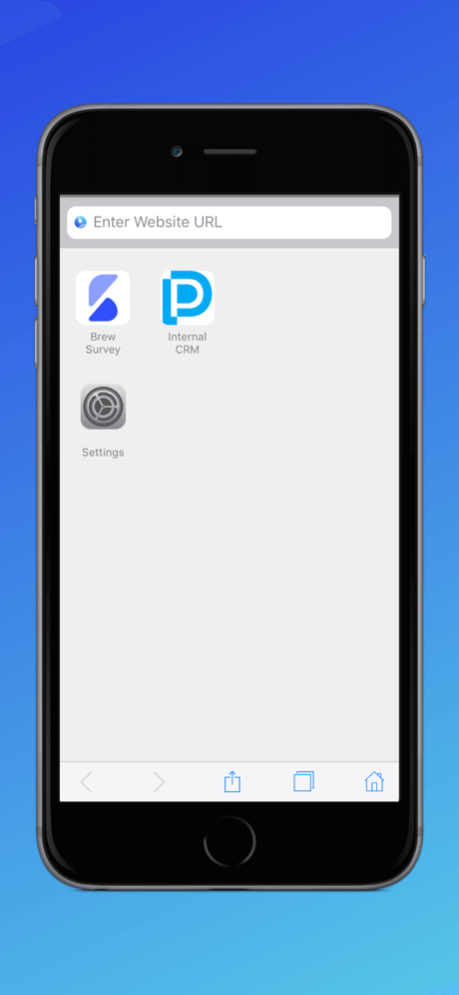
ProSurf Kiosk Lockdown Browser is a free, secure browser for iOS that locks down your iPad & iPhone into an interactive kiosk by allowing only business specific websites. It helps you create a safe browsing environment in iOS devices.
Key Features of ProSurf Kiosk Lockdown Browser:
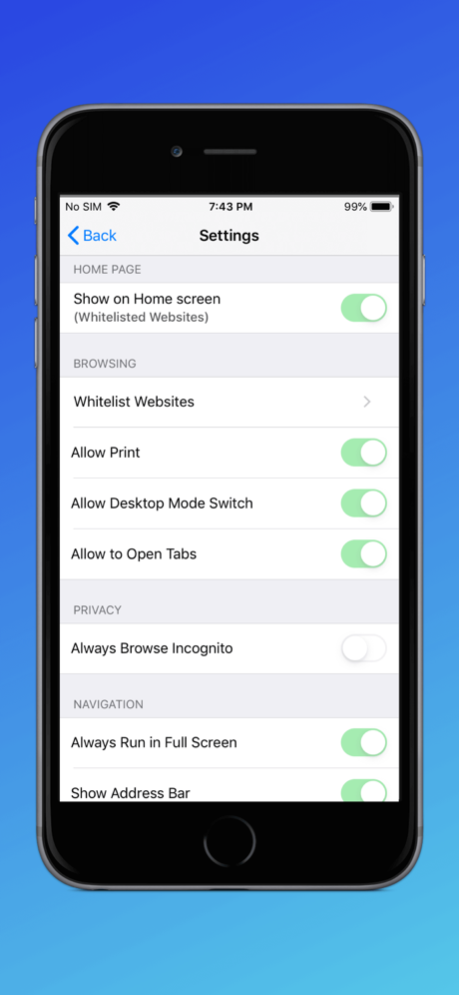
* Lockdown your iOS devices to a specific website
* Hide the address bar to block users from typing URLs
* Run sites in incognito mode
* Add browser shortcut on the device home screen
* Single & Multi-tab support
* Allow & disallow users to view download files
* Allow & disallow back/forward navigation
* Allow & disallow touch interface
* Allow & disallow Javascript popups
* Clear cache and cookies in the interval
* Control full screen more
* Control zoom in/out
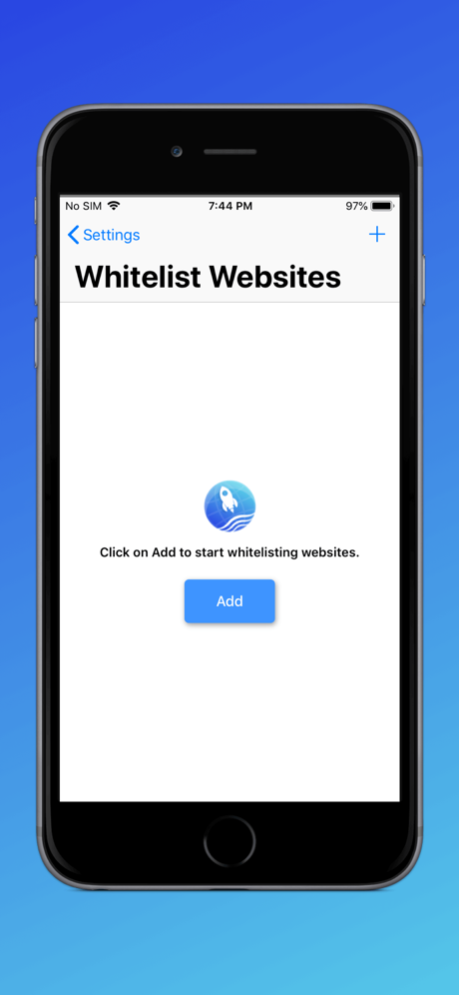
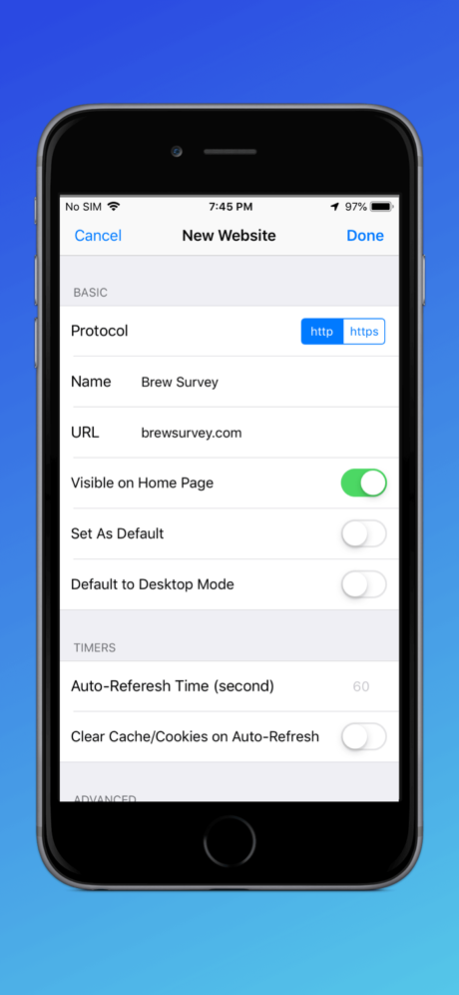
You can use the browser to whitelist as many sites as you want and set custom properties against each website.
Set additional properties like hiding the navigation bar, or hiding the URL address bar to get a complete Kiosk experience combined with Guided Access mode of iOS devices.

Once installed open the application and click on Getting Started to see the controls and options that ProSurf offers.

The default passcode to access Settings is 2323. Click on the Settings icon on the home page and start configuring ProSurf for your needs.

Version History - Added changes for iOS 26 compatibility. 1.8.1 Jul 11 - Added changes for iOS 26 compatibility. 1.8.0 09/11/2025 1. Control Copy/Paste Like a Pro – You can now block copy and paste in the ProSurf Browser straight from the Dashboard.
2. Make It Your Own – Set a custom user agent for ProSurf right from the Dashboard to match your needs. 1.7.0 06/17/2025 - Added support for French, Spanish, Portuguese, Russian, Japanese & German language translations
- Minor bug fixes and improvements 1.6.0 03/12/2025 - Minor bug fixes and improvements 1.5.1 01/07/2025 - Minor bug fixes and improvements 1.5.0 12/24/2024 - Added ability to block screenshots and screen recording when configured by the Admin.
- External links can be opened in Prosurf 1.4.0 11/22/2024 - Added ability to block screenshots and screen recording when configured by the Admin.
- External links can be opened in Prosurf 1.3.1 02/22/2024 Minor bug fixes and improvements. 1.3.0 08/19/2022 Minor bug fixes and improvements
. 1.2.1 08/11/2022 Minor bug fixes and improvements 1.2.0 06/10/2022 Minor bug fixes. 1.1.0 03/25/2022 - Overall App Stability
- Bug Fixes 1.0.6 06/29/2021 - Overall App Stability
- Bug Fixes 1.0.5 05/04/2021 - Overall App Stability
- Bug Fixes 1.0.4 04/23/2021 - Overall App Stability
- Bug Fixes 1.0.3 03/31/2021 - Overall App Stability
- Bug Fixes 1.0.2 03/31/2020 - Overall App Stability
- Bug Fixes 1.0.1 10/04/2018 1.0.0 10/04/2018


About ProSurf - Kiosk Browser

ProSurf - Kiosk Browser is a free app for iOS published in the Project Management list of apps, part of Business.

The company that develops ProSurf - Kiosk Browser is Promobi Technologies Private Limited. The latest version released by its developer is 1.8.1.

To install ProSurf - Kiosk Browser on your iOS device, just click the green Continue To App button above to start the installation process. The app is listed on our website since 2026-10-13 and was downloaded 0 times. We have already checked if the download link is safe, however for your own protection we recommend that you scan the downloaded app with your antivirus. Your antivirus may detect the ProSurf - Kiosk Browser as malware if the download link is broken.

How to install ProSurf - Kiosk Browser on your iOS device:

  • Click on the Continue To App button on our website. This will redirect you to the App Store.
  • Once the ProSurf - Kiosk Browser is shown in the iTunes listing of your iOS device, you can start its download and installation. Tap on the GET button to the right of the app to start downloading it.
  • If you are not logged-in the iOS appstore app, you'll be prompted for your your Apple ID and/or password.
  • After ProSurf - Kiosk Browser is downloaded, you'll see an INSTALL button to the right. Tap on it to start the actual installation of the iOS app.
  • Once installation is finished you can tap on the OPEN button to start it. Its icon will also be added to your device home screen.

Program Details


General

Publisher
Released Date
2026-10-13
Languages
English

Category

Category
Subcategory

System requirements

Operating systems
iOS

Download information

File size
32 bytes
Total downloads
0

Pricing

License model
Free
Price

Version History


Here you can find the changelog of ProSurf - Kiosk Browser since it was posted on our website on 2023-09-07. The latest version is 1.8.1 and it was updated on Apps112 on 15 October, 2026. See below the changes in each version:

version 1.8.1

posted on 2026-10-13

Version History - Added changes for iOS 26 compatibility. 1.8.1 Jul 11 - Added changes for iOS 26 compatibility. 1.8.0 09/11/2025 1. Control Copy/Paste Like a Pro – You can now block copy and paste in the ProSurf Browser straight from the Dashboard.
2. Make It Your Own – Set a custom user agent for ProSurf right from the Dashboard to match your needs. 1.7.0 06/17/2025 - Added support for French, Spanish, Portuguese, Russian, Japanese & German language translations
- Minor bug fixes and improvements 1.6.0 03/12/2025 - Minor bug fixes and improvements 1.5.1 01/07/2025 - Minor bug fixes and improvements 1.5.0 12/24/2024 - Added ability to block screenshots and screen recording when configured by the Admin.
- External links can be opened in Prosurf 1.4.0 11/22/2024 - Added ability to block screenshots and screen recording when configured by the Admin.
- External links can be opened in Prosurf 1.3.1 02/22/2024 Minor bug fixes and improvements. 1.3.0 08/19/2022 Minor bug fixes and improvements
. 1.2.1 08/11/2022 Minor bug fixes and improvements 1.2.0 06/10/2022 Minor bug fixes. 1.1.0 03/25/2022 - Overall App Stability
- Bug Fixes 1.0.6 06/29/2021 - Overall App Stability
- Bug Fixes 1.0.5 05/04/2021 - Overall App Stability
- Bug Fixes 1.0.4 04/23/2021 - Overall App Stability
- Bug Fixes 1.0.3 03/31/2021 - Overall App Stability
- Bug Fixes 1.0.2 03/31/2020 - Overall App Stability
- Bug Fixes 1.0.1 10/04/2018 1.0.0 10/04/2018

version 1.8.1

posted on 2026-07-15

Version History - Added changes for iOS 26 compatibility. 1.8.1 3d ago - Added changes for iOS 26 compatibility. 1.8.0 09/11/2025 1. Control Copy/Paste Like a Pro – You can now block copy and paste in the ProSurf Browser straight from the Dashboard.
2. Make It Your Own – Set a custom user agent for ProSurf right from the Dashboard to match your needs. 1.7.0 06/17/2025 - Added support for French, Spanish, Portuguese, Russian, Japanese & German language translations
- Minor bug fixes and improvements 1.6.0 03/12/2025 - Minor bug fixes and improvements 1.5.1 01/07/2025 - Minor bug fixes and improvements 1.5.0 12/24/2024 - Added ability to block screenshots and screen recording when configured by the Admin.
- External links can be opened in Prosurf 1.4.0 11/22/2024 - Added ability to block screenshots and screen recording when configured by the Admin.
- External links can be opened in Prosurf 1.3.1 02/22/2024 Minor bug fixes and improvements. 1.3.0 08/19/2022 Minor bug fixes and improvements
. 1.2.1 08/11/2022 Minor bug fixes and improvements 1.2.0 06/10/2022 Minor bug fixes. 1.1.0 03/25/2022 - Overall App Stability
- Bug Fixes 1.0.6 06/29/2021 - Overall App Stability
- Bug Fixes 1.0.5 05/04/2021 - Overall App Stability
- Bug Fixes 1.0.4 04/23/2021 - Overall App Stability
- Bug Fixes 1.0.3 03/31/2021 - Overall App Stability
- Bug Fixes 1.0.2 03/31/2020 - Overall App Stability
- Bug Fixes 1.0.1 10/04/2018 1.0.0 10/04/2018

version 1.8.0

posted on 2026-06-30

Version History - Added changes for iOS 26 compatibility. 1.8.0 09/11/2025 1. Control Copy/Paste Like a Pro – You can now block copy and paste in the ProSurf Browser straight from the Dashboard.
2. Make It Your Own – Set a custom user agent for ProSurf right from the Dashboard to match your needs. 1.7.0 06/17/2025 - Added support for French, Spanish, Portuguese, Russian, Japanese & German language translations
- Minor bug fixes and improvements 1.6.0 03/12/2025 - Minor bug fixes and improvements 1.5.1 01/07/2025 - Minor bug fixes and improvements 1.5.0 12/24/2024 - Added ability to block screenshots and screen recording when configured by the Admin.
- External links can be opened in Prosurf 1.4.0 11/22/2024 - Added ability to block screenshots and screen recording when configured by the Admin.
- External links can be opened in Prosurf 1.3.1 02/22/2024 Minor bug fixes and improvements. 1.3.0 08/19/2022 Minor bug fixes and improvements
. 1.2.1 08/11/2022 Minor bug fixes and improvements 1.2.0 06/10/2022 Minor bug fixes. 1.1.0 03/25/2022 - Overall App Stability
- Bug Fixes 1.0.6 06/29/2021 - Overall App Stability
- Bug Fixes 1.0.5 05/04/2021 - Overall App Stability
- Bug Fixes 1.0.4 04/23/2021 - Overall App Stability
- Bug Fixes 1.0.3 03/31/2021 - Overall App Stability
- Bug Fixes 1.0.2 03/31/2020 - Overall App Stability
- Bug Fixes 1.0.1 10/04/2018 1.0.0 10/04/2018

version 1.8.0

posted on 2025-09-11

- Added changes for iOS 26 compatibility.

version 1.8.0

posted on 2025-09-11

Sep 11, 2025
Version 1.8.0
- Added changes for iOS 26 compatibility.

version 1.7.0

posted on 2025-06-17

Jun 17, 2025
Version 1.7.0
1. Control Copy/Paste Like a Pro – You can now block copy and paste in the ProSurf Browser straight from the Dashboard.
2. Make It Your Own – Set a custom user agent for ProSurf right from the Dashboard to match your needs.

version 1.6.0

posted on 2025-03-12

Mar 12, 2025
Version 1.6.0
- Added support for French, Spanish, Portuguese, Russian, Japanese & German language translations
- Minor bug fixes and improvements

version 1.5.1

posted on 2025-01-07

Jan 7, 2025
Version 1.5.1
- Minor bug fixes and improvements

version 1.5.0

posted on 2024-12-24

Dec 24, 2024
Version 1.5.0
- Minor bug fixes and improvements

version 1.4.0

posted on 2024-11-22

Nov 22, 2024
Version 1.4.0
- Added ability to block screenshots and screen recording when configured by the Admin.
- External links can be opened in Prosurf

Disclaimer


Official App Store Link


We do not host ProSurf - Kiosk Browser on our servers. We did not scan it for viruses, adware, spyware or other type of malware. This app is hosted by Apple and passed their terms and conditions to be listed there. We recommend caution when installing it.

The App Store link for ProSurf - Kiosk Browser is provided to you by apps112.com without any warranties, representations or guarantees of any kind, so access it at your own risk.

If you have questions regarding this particular app contact the publisher directly. For questions about the functionalities of apps112.com contact us.


Click stars to rate this APP!

Users Rating:
  0.0/5     0
Downloads: 0
Updated At: 2026-10-15
Operating System: iOS
License Type: Free

TOP DOWNLOADS
in Business last week